
Appearance
Bill Presentment (Beta)
The Bill Presentment API allows you to retrieve outstanding bill information for a specific account or service. This enables your application to display current bill details, send bill reminder and automate recurring payments.
Your application should dynamically populate the bill information based on the API response. If a particular piece of information (e.g., name) is not returned by the API for a biller, that label or field should not be displayed to the user.
INFO
Integrate this API across all products. This will prevent the need to reintegrate it when a new biller is added later.
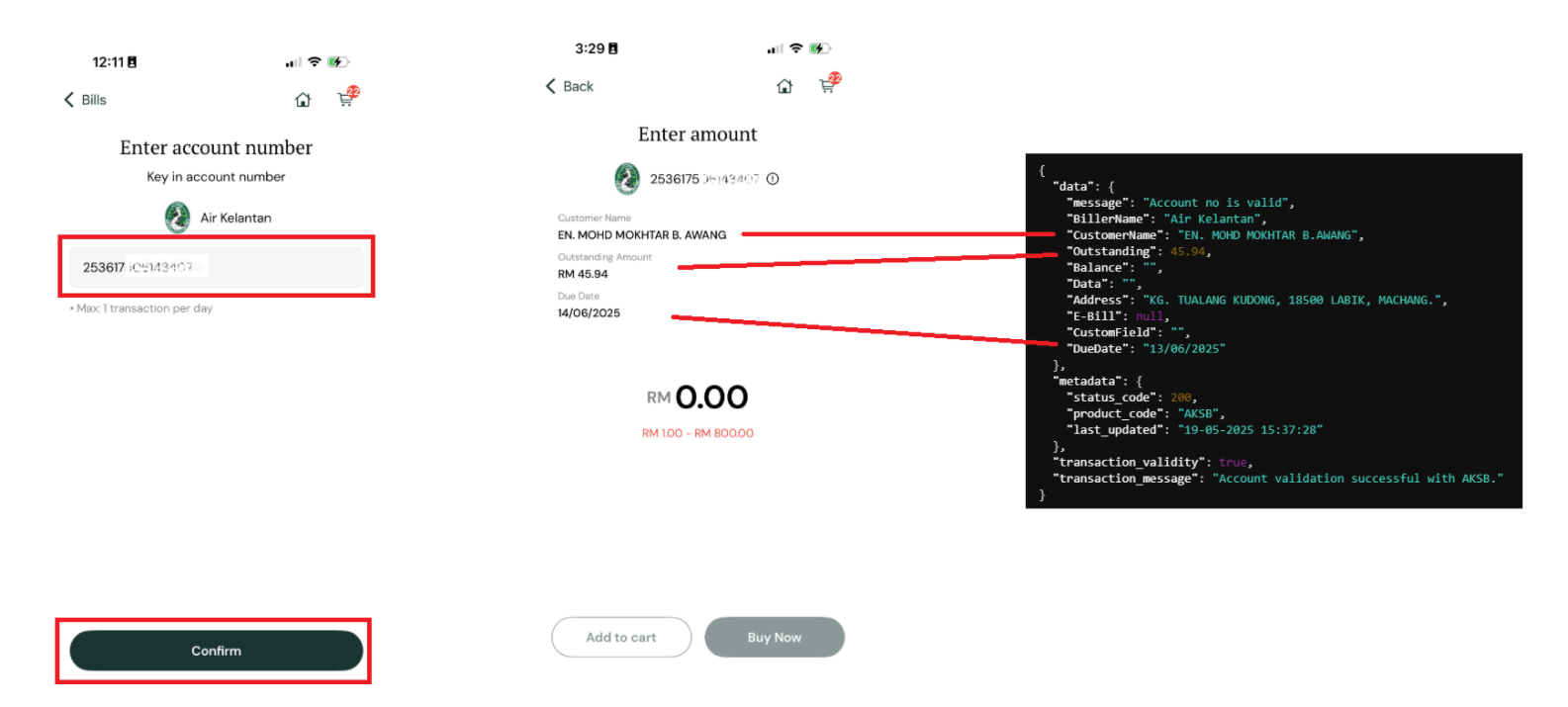
Error Handling:
| API Message Errordata['message'] | Application Response/Action | Can User Proceed ? | |
|---|---|---|---|
| Account no is valid | Display relevant bill information. If a particular piece of information is not returned by API, do not display that label or field to user | Yes proceed to payment if applicable | |
| Bill presentment is unavailable for this product | Do not display any bill information. | Yes proceed to payment | |
| Service unavailable. Please try again later | Do not display any bill information. | Yes proceed to payment | |
| Any other error | Do not display any bill information. | Yes proceed to payment | |
| Invalid account no | Prompt user with the error message displayed in response['error_message']Possible response['error_message'] valuesThe provided biller code is invalidThe provided amount is invalidInvalid account noRef-2 is required | No |
API Endpoint
http
GET https://api.iimmpact.com/v2/bill-presentmentRequest Headers
| Header | Description | Required |
|---|---|---|
Authorization | ID Token | No |
Query Parameters
| Parameter | Type | Required | Description |
|---|---|---|---|
account | String | Yes | The account number. For JomPAY, this is equivalent to Ref-1 |
product | String | Yes | Product code |
biller_code | string | No | The JomPAY biller code. This is only used if the product is JomPAY |
ref2 | string | No | An optional reference field for JomPAY. For JomPAY, this is equivalent to Ref-2 |
amount | string | No | Amount. This is only used if the product code is JomPAY |
Response 200
| Field | Type | Description |
|---|---|---|
data | object | |
data.message | string | Short description of the result |
data.BillerName | string | |
data.CustomerName | string | Account name |
data.Outstanding | number | Account outstanding |
data.Balance | string | Account balance |
data.Data | string | Account data balance |
data.Address | string | Customer address |
data.E-Bill | string | A PDF version of customer bill |
data.CustomField | string | |
data.DueDate | string | Bill due date |
metadata | object | |
metadata.status_code | number | |
metadata.product_code | string | |
metadata.last_updated | string | |
transaction_validity | boolean | |
transaction_message | string | |
error_message | string | Error label that can be use to display error message to user |
Example Response:
json
{
  "data": {
    "message": "Account no is valid",
    "BillerName": "Air Kelantan",
    "CustomerName": "EN. MOHD MOKHTAR B.AWANG",
    "Outstanding": 45.94,
    "Balance": "",
    "Data": "",
    "Address": "KG. TUALANG KUDONG, 18500 LABIK, MACHANG.",
    "E-Bill": null,
    "CustomField": "",
    "DueDate": "13/06/2025"
  },
  "metadata": {
    "status_code": 200,
    "product_code": "AKSB",
    "last_updated": "19-05-2025 15:37:28"
  },
  "transaction_validity": true,
  "transaction_message": "Account validation successful with AKSB.",
  "error_message": ""
}Response 400
| Field | Type | Description |
|---|---|---|
data | object | |
data.message | string | |
data.CustomerName | string | |
data.Outstanding | number | |
data.Balance | string | |
data.Data | string | |
data.Address | string | |
data.E-Bill | string | |
data.CustomField | string | |
data.DueDate | string | |
metadata | object | |
metadata.status_code | number | |
metadata.product_code | string | |
metadata.last_updated | string | |
transaction_validity | boolean | |
transaction_message | string | |
error_message | string |
Example Response:
json
{
  "data": {
    "message": "Invalid account no",
    "CustomerName": "",
    "Outstanding": null,
    "Balance": "",
    "Data": "",
    "Address": "",
    "E-Bill": "",
    "CustomField": "",
    "DueDate": ""
  },
  "metadata": {
    "status_code": 400,
    "product_code": "JOMPAY",
    "last_updated": "21-05-2025 13:40:23"
  },
  "transaction_validity": null,
  "transaction_message": null,
  "error_message": "The provided biller code is invalid"
}