Appearance
Report Issue
DANGER
AI-powered intelligence and automation are only active in production. While staging can simulate API responses for testing, it won't trigger our automated workflows or send email replies.
API Reference
For the full endpoint specification (headers, request body, response schema, and examples), see Dispute Transaction API Reference.
The Report Issue API provides a direct way to integrate an issue-reporting mechanism within your application. This function is intended for end-users to raise concerns or disputes specifically for transactions that have already been successfully completed.
When to Use
This feature enables your customers to report problems they encounter after a transaction has been marked as successful. Common scenarios include:
Voucher/PIN Issues: The end-user experiences problems redeeming a purchased voucher (e.g., the voucher code appears invalid or has already been used), or a provided PIN/serial number is unusable.
Non-Updated Bill Payments: A bill payment was successfully processed and confirmed by IIMMPACT, but the end-user's account with the biller does not reflect the payment after a reasonable waiting period.
Service Discrepancies: Other issues where the service or product received does not match what was expected, despite a successful transaction confirmation.
Key Considerations
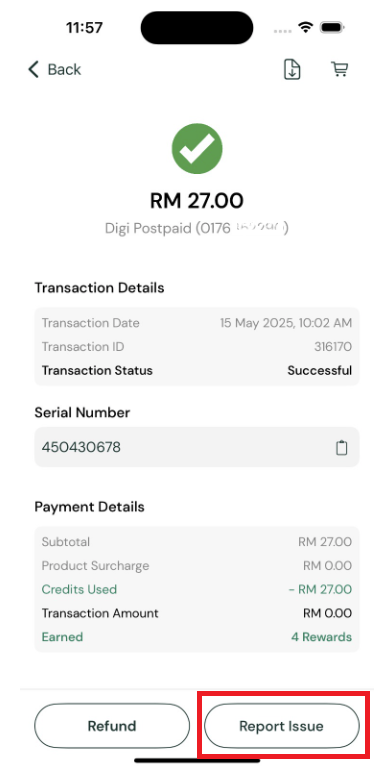
Successful Transactions Only: The UI element (e.g., a "Report Issue" button) that triggers this API call should only be displayed for transactions with a
Succesfulstatus. This function is not intended for failed or pending transactions.Outcome and Case Management: Successfully reporting an issue creates a support case within the IIMMPACT system. This case is managed through the AI-Powered Support Process, which may involve AI-driven resolution or escalation to human support.
Email Notifications: The registered email address of the initiating API account is always CC'd on all email correspondence sent to the end-user.
Integration Flow
User Initiates Report — The end-user triggers the issue report for a successful transaction via the "Report Issue" UI element in your application.
API Call to IIMMPACT — Your application makes a server-to-server API call to IIMMPACT's Dispute Transaction endpoint, providing the transaction reference ID and the user's email address.
Case Creation & Confirmation — IIMMPACT validates the request. Upon successful validation, a support case is created and a confirmation is returned.