
Appearance
Step 5: Make Payment
This is the central step in your integration — processing transactions via a single unified endpoint (POST /v2/topup) that handles all product types, including JomPAY, mobile recharge, gift cards, vouchers, eSIM purchases, and more.
API Reference
For the full endpoint specification (headers, request body, response schema, and examples), see Make Payment API Reference.
How It Works
- Initiate payment — Call
POST /v2/topupwith a uniquerefid, the product code, account number, and amount. - Handle the response — Check
data.statusfor the outcome:Accepted— Transaction accepted, processing will begin.Processing— Transaction still in progress. Re-query with the samerefidand parameters.Succesful— Transaction completed. Display the result to the user.Failed— Transaction failed. Checkdata.statusCodefor the reason.
- Check final status — If the response was
Processingor you encountered a network error, re-call the same endpoint with the identicalrefidand parameters.
Spelling Note
The success status value is spelled Succesful (single 's'), not Successful. This is a legacy quirk that cannot be changed. Match this exact string in your code.
| Status | StatusCode | Description | Retryable |
|---|---|---|---|
Accepted | 0 | Transaction accepted, processing will begin | Yes (re-query with same refid) |
Processing | 1 | Transaction is being processed | Yes (re-query with same refid) |
Succesful | 20 | Transaction completed successfully | No |
Failed | 40-61 (excl. 53) | Transaction failed (see statusCode for reason) | No (use new refid) |
Refund | 53 | Transaction voided and refunded | No |
Recommended Polling Strategy
When a transaction returns Processing, poll every 5-10 seconds by re-querying with the same refid. Most transactions resolve within 30 seconds. Always combine polling with callbacks — polling provides immediate UX feedback, while callbacks are the reliable final status delivery mechanism.
Retries — Do Not Generate a New refid
The API is idempotent: calling POST /v2/topup with the same refid will return the existing transaction, never create a duplicate. When retrying a payment — whether due to a Processing status, a network timeout, or any other error — reuse the original refid and parameters. Generating a new refid on retry will create a duplicate charge. Only generate a new refid for a genuinely new transaction.
Extras Parameters by Product
The extras object in the request body has different requirements depending on the product:
| Parameter | JomPAY | PTPTN | Mobile Data | Others |
|---|---|---|---|---|
subproduct_code | - | Mandatory | Mandatory | - |
ic_number | Mandatory (payee IC) | Mandatory (recipient IC) | - | - |
biller_code | Mandatory | - | - | - |
ref2 | Conditional | - | - | - |
ref2 is required by some JomPAY billers. The ref2 value is typically printed on the user's JomPAY bill. Use bill presentment to validate. The API returns an error if ref2 is required but not provided.
AMLA Compliance — JomPAY
DANGER
Due to AMLA (Anti-Money Laundering Act 2001) requirements, it is mandatory to perform eKYC on your end-users for all JomPAY transactions. Pass the verified IC number (Malaysians) or Passport number (non-Malaysians) via the ic_number field. Failure to comply, or providing fictitious/invalid numbers, may lead to account suspension.
Success UX
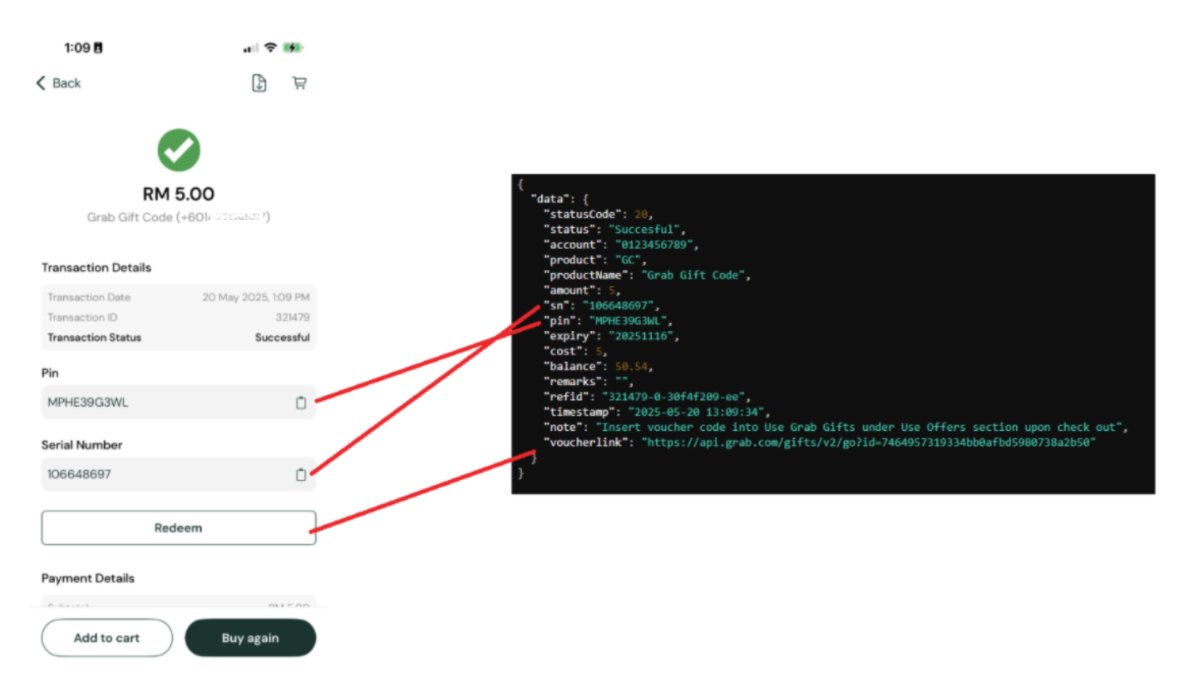
After a successful transaction, display the following fields to the user:
| Field | Description |
|---|---|
sn | Serial number or identifier generated by the provider/operator. Include a Copy button. |
pin | PIN for vouchers, gift cards, and similar products. Include a Copy button. |
voucherlink | A URL to open in a web view for voucher redemption. |
| Share button | Allow the user to share the transaction via WhatsApp, email, SMS, etc. |
DANGER
If a field (sn, pin, expiry, voucherlink) is not returned by the API, do not display that label or field to the user.
Failure UX
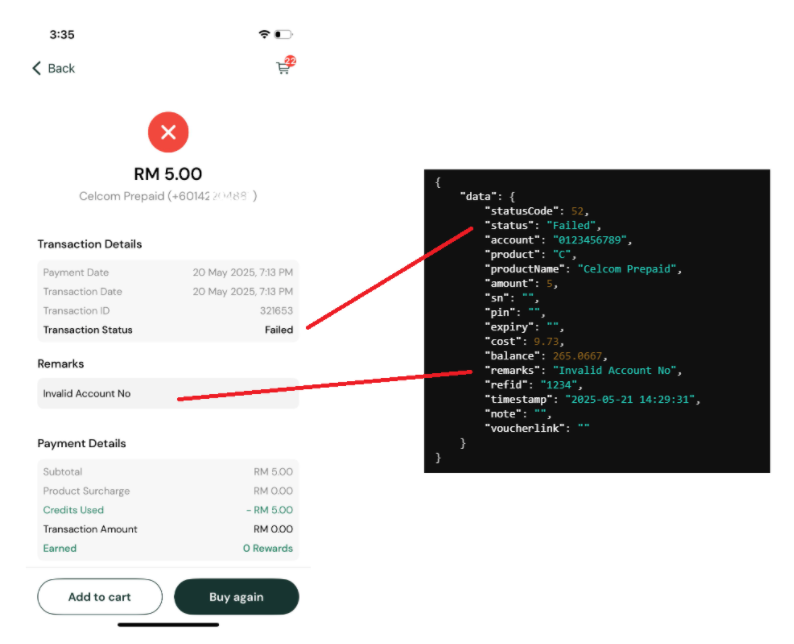
After a failed transaction, display the failure reason so the user understands what went wrong:
| Field | Description |
|---|---|
remarks | The failure reason returned by the API. |
Error Handling
Error codes for failed transactions can be found in the Payment Errors reference.
WARNING
Staging server statuses and failure reasons might not match production due to limited validation.